
Introduction
Actuals supports multi-currency accounting, enabling consistent financial reporting across transactions in different currencies. A currency represents the unit in which financial values are recorded. Currencies can be activated or deactivated per administration, allowing organizations to control which currencies are available for use.
Actuals stores financial values in both the transaction currency and the administration currency, ensuring accurate reporting and consolidation.
Term | Description |
Transaction currency | The currency in which the transaction (journal entry) is recorded, for example USD if an invoices is issued in USD. |
Administration currency | The primary currency of the administration (also referred to as Base Currency or Functional Currency). If the transaction currency differs, Actuals converts the amounts using the applicable exchange rate on the transaction date. |
Currency configuration
To configure currency settings, navigate to Configuration → Currencies.

The currency menu is only available when the multi-currency feature is enabled for the administration. Contact your Actuals Implementation Consultant if this option is not available.
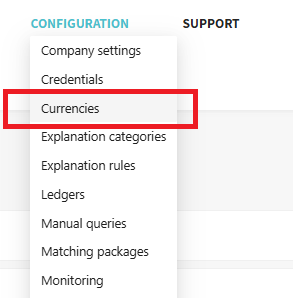
Configuring the currencies is a three-step process:
- Enabling Multi Currency
- Setting the Administration Currency
- Activating foreign currencies
Step 1. Activating Multi-currency
Activate the multi currency feature by toggling the multi currency setting.
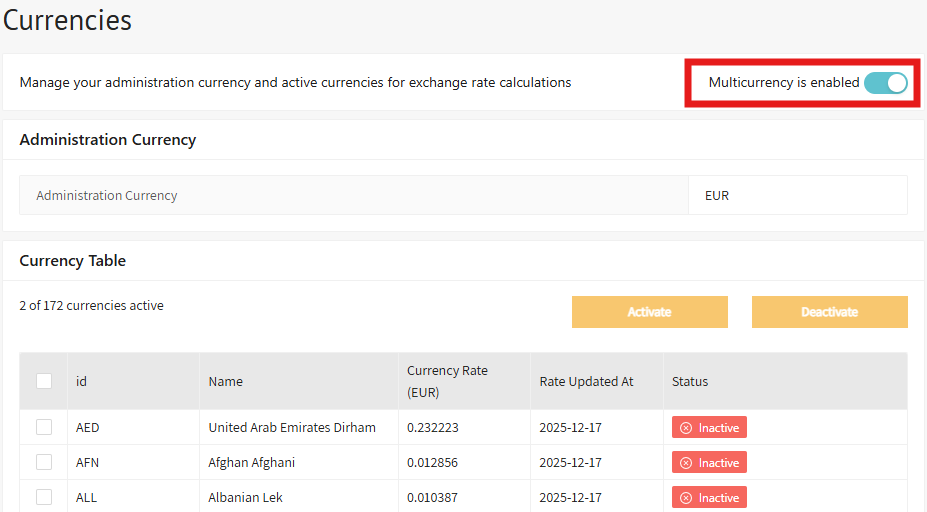
Step 2. Setting the Administration Currency
The administration currency is the primary currency used for reporting and aggregation across the platform. It typically reflects the company’s main operating location (for example, EUR for EU-based companies).
When a transaction is recorded in a different currency, Actuals calculates the administration currency amount by applying the exchange rate valid on the transaction date.
Key points:
- Setting the administration currency can be done once and cannot be changed later.
- The administration currency can be used for all reporting and aggregation.
- A confirmation dialog is shown before saving to prevent accidental changes.
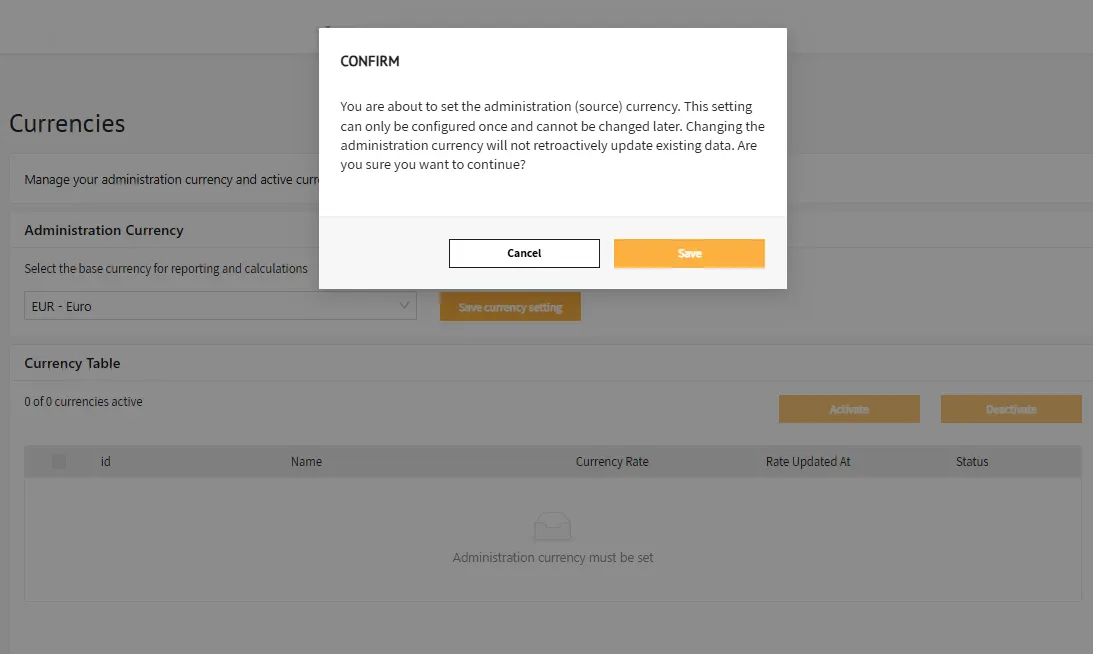
Step 3. Setting Active Foreign Currencies
Foreign currencies determine which transaction currencies can be used in journal entries.
- Journal entries can only be created in activated currencies.
- Imports containing inactive currencies will fail.
- A daily exchange rate can be maintained for each active currency and is used for automatic conversion.
- Select one or more currencies and click Activate to make them available immediately.
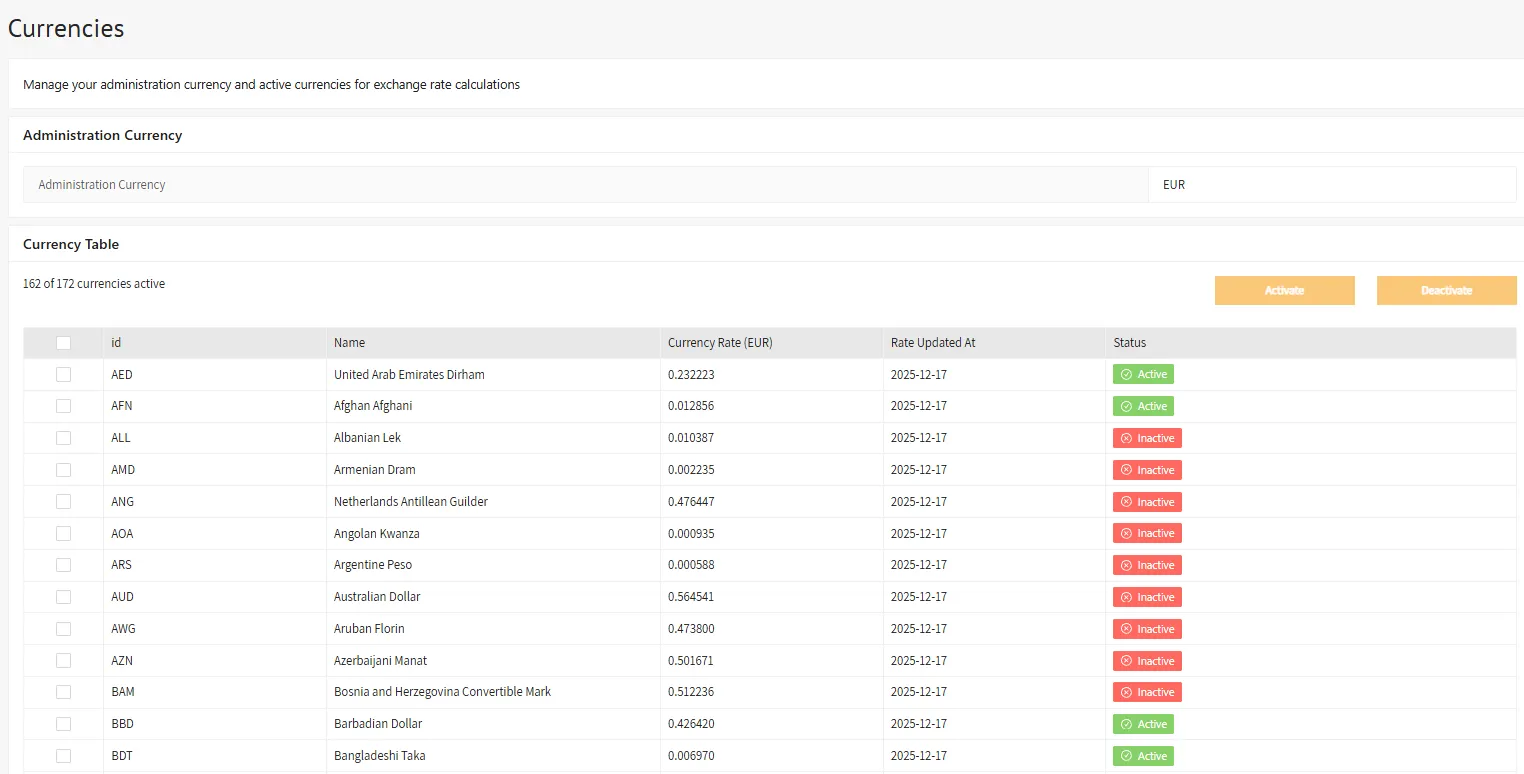
Additional information
Default Reporting Currency
Your Actuals Implementation Consultant can configure the default currency used in reports. After setting the administration currency, it is recommended to update reports to display values in the administration currency rather than the transaction currency.
Exchange Rate Provider
Actuals provides automatic exchange rates for converting foreign currencies into the administration currency.
- Rates are sourced from https://openexchangerates.org/
- Rates are collected daily
- Conversion is applied automatically during data ingestion
- Rates are determined based on the transaction date
If you require a different exchange rate provider, contact your Actuals Implementation Consultant to discuss available options.
Calculated Amounts
Configured currencies are reflected in the following properties:
Currency type | Currency property | Value property |
Transaction currency | amountcurrency | amount |
Administration currency | reportingamountcurrency | reportingamountvalue |
Behaviour Notes
- Transactions with inactive currencies cannot be imported.
- Transactions with future dates use the most recent available exchange rate.
- Currency codes must be provided in ISO 4217 format, in uppercase and without trailing spaces.
- An exchange rate can be provided per transaction using the
transactionexchangerateproperty. When supplied, this rate overrides the rate lookup mechanism.
- Changing the administration currency does not recalculate historical data and may result in inconsistent reporting.