
General Ledger Accounts
Maintain the financial ledgers (general ledger accounts) used across transformation and reconciliation.
Open Transformation › Setup › General Ledger Accounts in the app.
(Formerly Ledgers.)
What you can do
Create, view, edit, and delete ledgers for this company.
The list columns typically include Code, Code Addition, ID, Name, Balance Type, Category, Currency Revaluation, and Global Code. Row actions include View, Edit, Delete, and more. Use Search & Filter, Refresh, and Create Ledger.
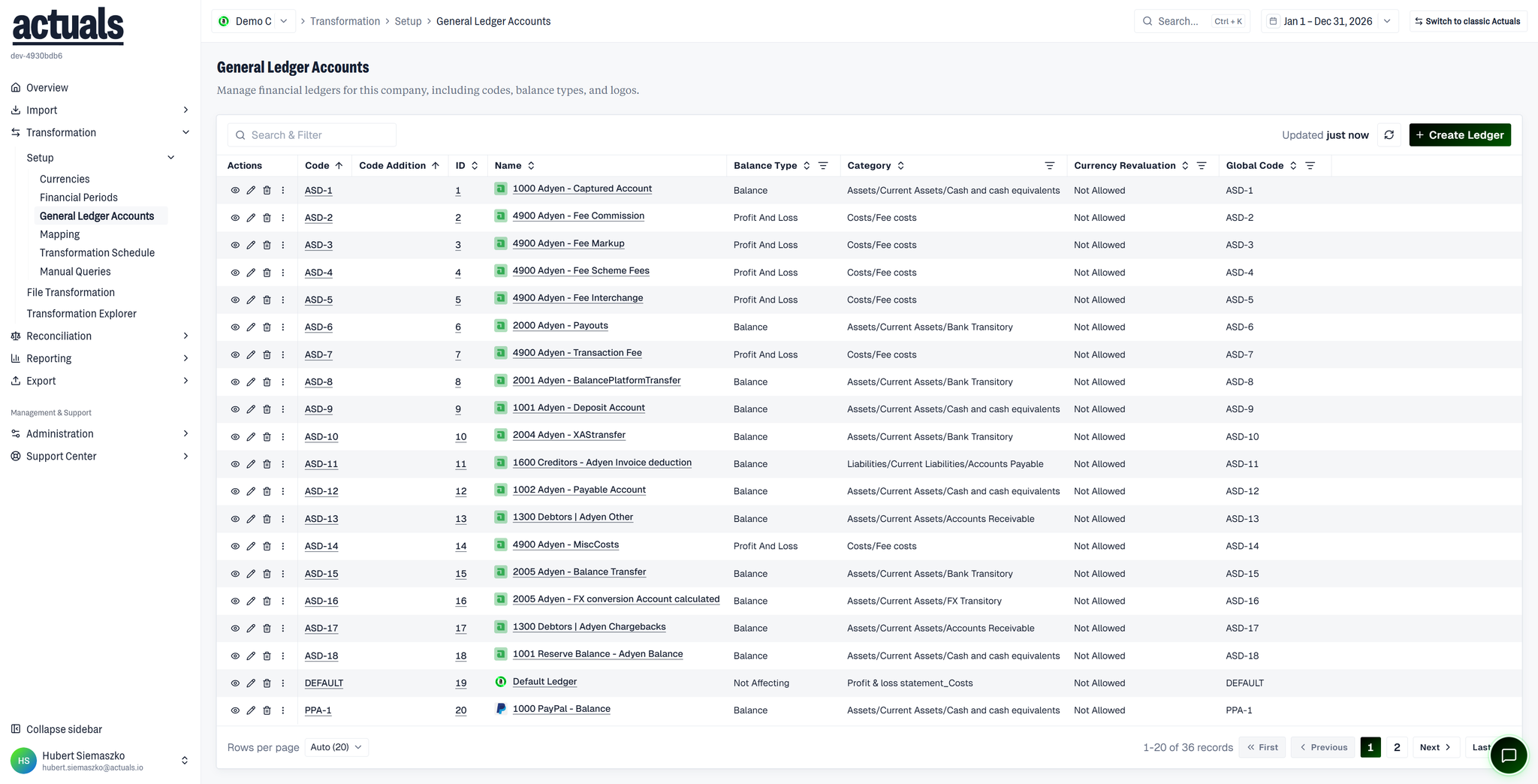
Fields when creating or editing:
Field | Purpose |
Name | Display name |
Code / Code addition | Account coding |
Global code | Optional standardized code |
Category | Ledger classification |
Balance type | How balances are interpreted |
Currency revaluation | Whether revaluation applies |
Logo | Optional visual marker |
Codes and global codes must be unique where used. The system ledger cannot be edited or deleted.
Using ledgers elsewhere
- Assign ledgers in
 Mapping (ledger mapping / iterations)
- Filter transformed transactions by ledger in
 Transformation Explorer
- Matching packages in Reconciliation also reference ledgers
Permissions
Creating, updating, or deleting ledgers requires the appropriate role permissions.